
It is Tuesday. A purchase order confirmation for $18,400 arrives from your biggest supplier. Nobody remembers approving it. It turns out a junior buyer replied “go ahead” to a supplier email during a busy week, and the stock lands in three weeks, right after your quarterly tax bill.
Now ask your platform: what does WooCommerce know about this purchase? The answer is nothing, because WooCommerce has no concept of a purchase order at all. No approvals, no receiving, no commitments. Your storefront records sales beautifully and stays completely blind to purchasing.
This guide fixes that blindness. It covers why native WooCommerce cannot govern purchasing, what unmanaged buying actually costs, the six stages of a professional PO workflow, how to set approval thresholds that protect cash without slowing your team, a roles matrix you can copy, and a 30-day rollout plan.
Contents:
1. Why Native WooCommerce Cannot Approve What It Cannot See
WooCommerce models selling, not buying. Its data structures contain orders, customers and products. There is no purchase order object, no approval state, no supplier record with costs and lead times, and no receiving workflow. Stock quantities change through manual edits or order refunds, and that is the entire story.
So purchasing migrates elsewhere: email threads, a shared spreadsheet, a chat channel. The store becomes a record of outcomes (stock eventually got edited) rather than decisions (who committed what, at which price, with whose approval). Every problem in the next section grows from that single gap.
2. What Unmanaged Purchasing Costs
- Rogue spend. Commitments made without approval surface only when the invoice arrives, mid cash crunch.
- Duplicate orders. Two people see the same low stock alert and order the same SKU. Now you own double the cover.
- Budget blindness. Committed but unreceived stock is invisible, so “available cash” is a fiction until deliveries land.
- No audit trail. Who approved it? At what unit cost? Was freight included? If the answer lives in someone’s inbox, you do not have an answer.
- Supplier disputes. Verbal quantities versus delivered quantities, with no receiving record to settle it.
- Segregation of duties failure. When the person who creates supplier records can also approve purchases and receive stock, you have built a fraud pathway and called it convenience.
- Year-end chaos. Open commitments unknown means accruals guessed, and accountants billing you hourly for the guessing.
None of these are discipline problems at root. They are tooling gaps wearing discipline costumes, exactly like the inventory pains covered in our complete guide to WooCommerce inventory management.
3. Anatomy of a Professional PO Workflow
A mature purchase order moves through six stages, each with an owner, a state and a record.
Stage 1: Demand signal
Every PO starts from a reason: a forecasting digest suggestion, a reorder point breach, a seasonal plan, or a manual request. Capturing the reason at birth is what separates purchasing from gambling.
Good looks like: the PO references its trigger, so approvals can judge necessity, not just price.
Stage 2: Draft
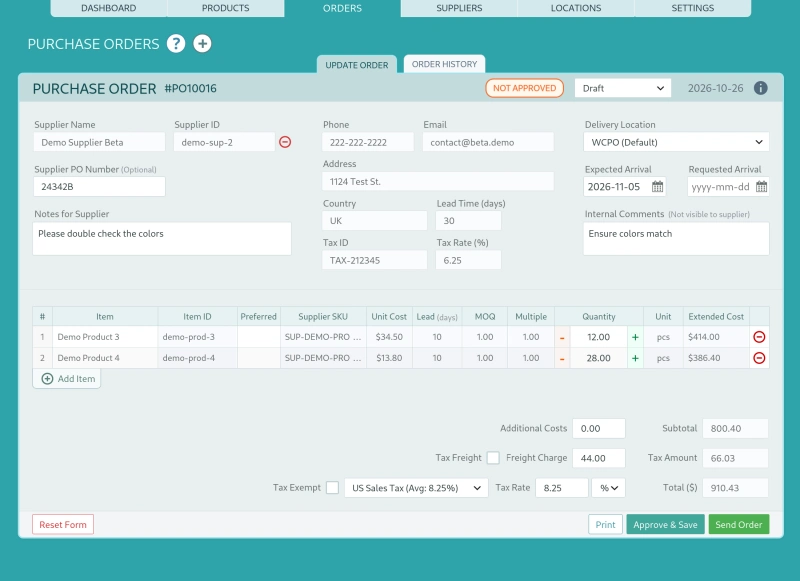
The buyer assembles lines against a supplier record that already holds current costs, minimum order quantities and order multiples. Delivery location is selected, and tax plus freight are entered so the commitment reflects landed cost, not a hopeful unit price.
Good looks like: MOQ and order-multiple rules applied automatically, so drafts are supplier-valid before anyone spends attention on them.
Stage 3: Approval routing
The draft enters a pending state and routes to the right approver by threshold rules. The approver can approve, reject, or send it back with a comment. Critically, nobody can transmit a PO while it sits unapproved. The system enforces what policy alone cannot.
Good looks like: every transition timestamped with user and decision, including rejections and returned drafts.
Stage 4: Dispatch
On approval, the PO is emailed to the supplier as a branded PDF with a CSV attachment for their systems, and the state flips to sent. One channel, one version of the truth, no “please confirm v3 of the attached”.
Good looks like: dispatch logged with timestamp, recipient and attachments, from inside the system rather than a personal mailbox.
Stage 5: Receiving
Deliveries rarely arrive complete. Professional receiving checks in against PO lines, supports partial quantities, and records each receipt into the stock ledger at the correct location. Barcode scanning turns a 40-minute clipboard exercise into a 4-minute sweep.
Good looks like: received quantity, remaining quantity and over-receipt flags visible per line, with every receipt carrying a user and a location.
Stage 6: Close and sync
When lines complete (or are deliberately closed short), the PO closes. The supplier bill matches against recorded landed cost, the purchase flows to QuickBooks or Xero, and the supplier’s actual lead time updates their card, sharpening tomorrow’s forecasts.
Good looks like: your accountant reconciling bills in minutes because the PO, the receipt and the cost already agree.
4. Approval Rules That Protect Cash Without Slowing the Team
Bad approval workflows feel like bureaucracy: everything waits, approvers become bottlenecks, and people start routing around the system. Good workflows approve by risk, not by habit.
Principles:
- Threshold on landed value, not unit count. A 500-line order of packing tape is not the same risk as ten units of your hero product.
- Exception routes for novelty. New suppliers and first-time products carry unknown risk, so they route higher regardless of value.
- An auto-approval lane for forecast-driven reorders inside pre-agreed budgets. Your weekly digest suggestions, approved once as a budget, should not requeue for signature line by line.
- Delegation and reminders. Approvers take holidays. Rules need a backup path and an escalation timer, or pending becomes permanent.
| Condition | Route |
| Under $500, existing supplier | Buyer self-approves within budget |
| $500 to $5,000 | Operations manager |
| $5,000 to $20,000 | Owner or finance lead |
| Above $20,000 | Owner plus finance lead |
| Any value, new supplier | Owner or finance lead |
| Forecast digest reorder within agreed budget | Forecast digest reorder within agreed budget Auto-approved, reviewed weekly |
Tune the numbers to your cash position, then review them quarterly. Thresholds are policy, and policy rots if untouched.
5. Roles and Permissions Matrix
Segregation of duties in one table. Adjust titles to your org chart, keep the separations.
| Capability | Buyer | Ops manager | Owner / finance | Warehouse staff |
| Create and edit drafts | Yes | Yes | Yes | No |
| Approve within threshold | Yes | Yes | Yes | No |
| Approve above threshold | No | Yes | Yes | No |
| Transmit PO to supplier | Yes | Yes | Yes | No |
| Receive stock against PO | Yes | Yes | Yes | Yes |
| Adjust stock with reason | No | Yes | Yes | Yes |
| Manage supplier records | No | Yes | Yes | No |
| View spend and commitment reports | No | Yes | Yes | No |
Notice the two deliberate separations: warehouse staff receive but never approve, and buyers create but never authorize above threshold. Those two lines are your fraud control, and they cost nothing but configuration. This is what multi-user inventory management in WooCommerce should feel like: granular capabilities, not shared admin logins.
6. The Audit Trail You Will Be Glad You Kept
Record, at minimum: who created and edited each draft, who approved or rejected and when, dispatch timestamp and attachments, every receipt with user, location and quantity, price changes with reasons, and every state transition.
Why bother? Four moments will answer for you:
- A supplier invoices for 100 units and your receiving record says 80. Settled in one email.
- Your accountant asks which quarter a commitment belongs to. Answered from the state history.
- An internal review finds a pattern of price edits after approval. Visible instead of invisible.
- Due diligence for a loan or an acquisition asks for purchasing history. A clean, exportable ledger changes the conversation, and sometimes the valuation.
An audit trail is not distrust of your team. It is memory for your business.
7. Three Ways to Implement This in WooCommerce
Option A: Email and spreadsheets. Free, familiar, and it breaks at your second hire. No enforcement, no ledger, no receiving. Fine below roughly 50 SKUs and one person buying.
Option B: Basic PO plugins. They generate a nicer PDF and email it. Most stop there: no approval states, no threshold routing, no partial receiving, no ledger entries. You have improved the document, not the process.
Option C: A professional procurement layer. This is the gap WiseStock by WCWise was built to close. In practice the six stages above map directly onto the plugin:
- Drafts carry supplier costs, MOQs, order multiples, delivery locations, tax and freight.
- Pending POs queue for approvers by threshold, with approve, reject and return-with-comment.
- Approved POs dispatch by email with PDF and CSV attachments, state tracked to sent.
- Receiving runs line by line, partials included, with barcode scan check-in writing to the stock ledger.
- Roles enforce the matrix in section 5, and every transition lands in the transaction history.
- Closed POs sync to QuickBooks and Xero, suppliers to vendors, without middleware.
If you are weighing this against leaving WooCommerce entirely for an ERP, read our multi-channel versus all-in-one ERP comparison and the Magento migration breakdown first. Spoiler: procurement depth is exactly the layer you can add instead of migrating.
8. The 30-Day Rollout Checklist
Week 1: Policy. Set thresholds with your finance lead. Assign roles and a delegation path. Write the receiving SOP (who checks in, how partials are flagged, how discrepancies escalate).
Week 2: Configuration. Load supplier records with costs, MOQs and lead times. Import open POs and product data by CSV so day one starts truthful. Configure approval routes and the auto-approval lane.
Week 3: Cutover. Pick a date and stop email POs cold. Parallel systems produce parallel truths. Train receiving staff on scanning and reason codes.
Week 4: First review. Run the open commitments report, check approval turnaround times, and compare supplier promised lead times against actuals. Adjust thresholds where reality disagrees with policy.
Quick Answers
Can WooCommerce approve purchase orders natively? No. There is no PO object, approval state or receiving workflow in core. Purchasing governance requires a dedicated layer.
We are a two-person team. Do approvals still matter? Yes, in the lightest form: the person who creates a PO should not be the only person who approves it. One threshold and one backup approver keeps friction near zero while closing the segregation gap.
What exactly is partial receiving? Checking in fewer units than ordered, against specific PO lines, with the remainder tracked as outstanding. Stock updates for what arrived, commitments stay visible for what did not, and the PO closes only when you decide.
How do approved POs reach my accountant? Through native sync: suppliers map to vendors and purchase records flow into QuickBooks or Xero, so bills reconcile against recorded landed cost instead of re-keyed guesses.
Purchasing with a paper trail, not a prayer. WiseStock brings approval workflows, partial receiving, barcode check-in and native accounting sync to WooCommerce, self-hosted and without the SaaS tax. Launching soon with a limited Founding Member Lifetime Deal. [Join the waitlist]