Every inventory error you have ever investigated started the same way: a human typing a number. A transposed digit at the dock, a misread quantity during a count, a wrong SKU keyed during an adjustment. Barcodes do not make your team careless-proof by policy. But they do make errors structurally difficult, by removing the keystroke from the loop.
We hope this guide will provide you with the complete picture on barcodes for WooCommerce brands: how to plan a barcode system before printing a single label, including which code formats fit which job and why. Whether or not you need to buy barcodes or can generate your own (spoiler: it depends on who consumes them). Which hardware fits which workflow including the smartphone already in your pocket. The workflows that pay for the project. And an honest look at which tools in the market actually ship barcode capability.
Contents
1. Why Scanning Is the Error-Prevention Layer
The business case is arithmetic, not aesthetics.
Time math. Manual receiving runs roughly 45 to 90 seconds per line: find the PO, find the line, read the SKU, type it, type the quantity, verify. Scan receiving runs 10 to 15 seconds per line: scan, confirm quantity, next. On 200 lines per week that recovers two to four hours weekly, before counting errors.
Error math. One mis-keyed receipt does not cost one minute. It costs the investigation when the system says 14 and the shelf says 9, the stockout on a unit you technically own, and the cycle count variance that nobody can classify. Keystroke errors are low-frequency and high-cost, which is exactly the profile prevention beats detection.
Sustainability math. Cycle counting only sticks if counting is fast. Scan-assisted counts turn a dreaded quarterly event into a weekly ten-minute rhythm, which is the foundation of the accuracy stages described in the inventory accuracy guide.
2. Planning Your Barcode System
Most failed barcode projects fail before printing, at the planning stage. Seven decisions, in order:
Decision 1: Purpose. Operational codes (internal tracking), retail trade codes (checkout at any store on earth), or marketplace compliance (Amazon GTIN rules). Purpose dictates format, issuer and label design. Many brands need two layers: trade codes on consumer packaging, internal codes on bins and cartons.
Decision 2: Scope and sequence. Label A-items first, then B, then C, following your cycle count cadence. Label locations too, not just products: bin labels let you scan a location before scanning items, which powers directed counts and unambiguous transfers in hierarchical location systems.
Decision 3: Numbering scheme. If your SKUs are clean ASCII without strange punctuation, encode the SKU directly into Code128 and skip a parallel identity system entirely. If SKUs are messy or reused, assign sequential internal IDs with a prefix convention (for example WH-000123) and map them to SKUs in your inventory system. Never encode meaning you will regret: category prefixes rot the day you reclassify.
Decision 4: Label standard. One size floor, one field set, one placement rule. Details in section 7.
Decision 5: Hardware per station. Map workflows to devices before buying ten of anything: dock gets a tethered or Bluetooth wedge, count floor gets smartphones, counter gets whatever is already plugged in. Section 5 has the matrix.
Decision 6: Software requirements. A scanner is a keyboard with a laser. It only matters if your inventory tool listens: wedge input capture with Enter-suffix handling, PO line matching on scan, ledger writes with user and reason, code generation for Code128, QR and Data Matrix, and printable label templates. Check these before buying hardware, not after.
Decision 7: Pilot and measure. Thirty days on A-items, with before-and-after metrics: seconds per receiving line, count duration, variance rate. Section 9 has the plan.
3. Barcode Types and Formats: Benefits and Drawbacks
| Format | Family | Issued by | Phone camera | Best for | Benefits | Drawbacks |
| Code128 | 1D | You | Good | Internal operations, bins, cartons | Full ASCII, high density, free to generate, every scanner reads it | Linear size grows with content length |
| Code39 | 1D | You | Good | Legacy industrial setups | Extremely tolerant of poor printing | Low density, bulky labels, limited characters |
| EAN-13 / UPC-A | 1D | GS1 | Good | Retail checkout, consumer packaging | Universally accepted at POS and marketplaces | Must be licensed, fixed 12 or 13 digit structure |
| ITF-14 | 1D | GS1 | Fair | Outer cases and cartons | Prints well on corrugated cardboard | Physically large for the data, slow for high-volume ops scanning |
| QR Codes | 2D | You | Excellent | Consumer-facing links, manuals, marketing | Huge capacity, URL friendly, damage tolerant | Needs better lighting and optics than QR |
| Data Matrix | 2D | You | Fair/Good | Tiny items, electronics, medical | Smallest physical footprint, very high density | Needs better lighting and optics than QR |
The practical reading of that table: Code128 is the internal workhorse for almost every WooCommerce operation because you generate it yourself, it encodes any clean SKU, and it scans fast on cheap hardware. QR earns its place facing consumers, not facing your dock. Data Matrix solves the tiny-item problem where a Code128 would not physically fit. EAN, UPC and ITF-14 are trade codes with an issuer, covered next.
4. Do You Need to Buy Barcodes, or Can You Make Your Own?
This is the most searched barcode question in ecommerce, and the honest answer splits by consumer:
For internal operations: make your own. Code128, QR and Data Matrix carry no licensing authority. Generate them from your SKUs or internal IDs, print them, scan them, done. This is exactly what WiseStock’s barcode generation covers: Code128, QR and Data Matrix, produced inside your WooCommerce admin and printable on standard label stock.
For retail checkout and marketplaces: buy them, from GS1 only. EAN and UPC codes are licensed trade identifiers tied to a company prefix. GS1 membership pricing starts in the low hundreds of dollars per year for small ranges and scales with company size. Two warnings that save real money:
- Grey-market “lifetime barcode” resellers are a trap. They resell prefixes registered to someone else. Marketplaces increasingly verify GTINs against the GS1 database, and listings get suppressed when the prefix owner does not match your brand. Cheap barcodes become dead listings.
- Never reuse or recycle codes, internally or externally. A reused code is a data integrity bomb with a delayed fuse.
The hybrid model most scaling brands land on: GS1 trade codes on consumer packaging where retail or marketplace rules demand them, self-generated Code128 on bins, cartons and internal labels for operations. The two layers never intersect, and your internal system never depends on a licensing renewal.
5. Hardware: Wedge, Bluetooth and the Smartphone in Your Pocket
USB wedge scanners. They emulate a keyboard: scan equals typed characters plus an Enter suffix, no drivers, no pairing, twenty to sixty dollars. Tethered, so they live at a station. The dock desk and the counter love them. Configure the Enter suffix explicitly, because your inventory software uses it to commit the scan.
Bluetooth wedge scanners. Same keyboard emulation, wireless, sixty to two hundred dollars. Freedom to walk a pallet, at the cost of pairing drift and battery discipline. Buy cradles, label them, and assign them to stations anyway, because lost scanners are a real tax.
Smartphones and tablets. The device your team already carries is a capable scanner through browser camera scanning: modern web libraries decode Code128 and QR reliably in decent light, with zero hardware budget. Strengths: always present, ideal for cycle counts on the floor, quick lookups, adjustments anywhere, and onboarding new staff without buying gear. Limits: lighting dependence (dim warehouses degrade performance), Data Matrix struggles on small or curved surfaces, and scan ergonomics get tiring past a few hundred scans per session. The practical rule: phones for counts, lookups and adjustments; dedicated wedges for high-volume dock receiving. WiseStock supports both paths: wedge input and browser camera scanning.
Rugged handheld terminals. Android PDAs with integrated imagers, three hundred dollars and up per unit. Genuine tools for high-volume operations, overkill for most SMBs. Mentioned for completeness, not recommended as a starting point.
| Workflow | Recommended device | Why |
| Dock receiving against POs | USB or Bluetooth wedge | Speed, ergonomics, volume |
| Cycle counts on the floor | Smartphone camera | Mobility, zero hardware cost |
| Stock adjustments anywhere | Smartphone camera | Presence, spontaneity |
| Counter lookup and sales support | Whatever is plugged in | Convenience |
| Tiny-item or curved-surface labels | Wedge with good imager | Camera optics struggle here |
6. The Workflows That Pay for the Project
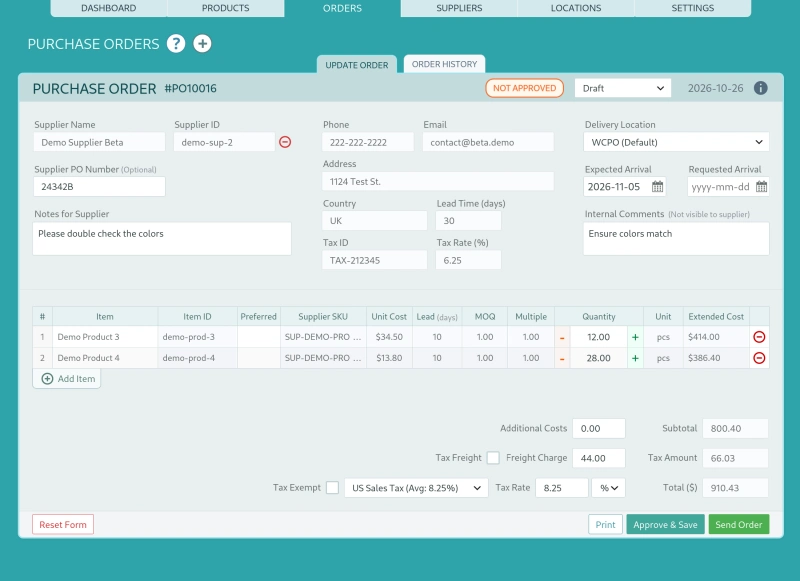
Scan receiving against PO lines. Select the PO, scan each line’s code, confirm quantity, close partials explicitly. Over-receipt flags and short-ship states stay visible, and every receipt writes to the ledger with user, location and timestamp. This is the dock workflow detailed in the purchase order approvals guide, with the clipboard removed.
Scan-driven adjustments. Scan the item, enter the corrected quantity, attach a reason code. The ledger entry carries proof of what and why, which is what turns counts into learning rather than silent edits.
Scan-assisted cycle counts. Scan the bin label, scan the items, compare against expected quantities blind. Count duration drops enough that weekly A-item counts become sustainable, which is the single biggest accuracy lever in the five-stage accuracy model.
Quick lookup and stock status. Scan to see on-hand, on-order and location breakdown instantly, at the counter or on a supplier call.
What scanning is not: it is not a pick-and-pack system. Picking and packing remain in your WooCommerce fulfillment workflow or a dedicated packing tool. Scanning’s job here is truth at the dock, on the shelf and in the ledger, and staying honest about scope is why the workflows above actually stick.
7. Labels and Printing That Survive a Warehouse
- Human-readable text always. When a label tears or a scanner dies, humans finish the job. Code plus SKU text plus product name.
- Size floors. Unit labels at or above 25 by 15 millimetres with a 300 DPI thermal printer. Bin labels larger, placed at consistent eye height.
- Material honesty. Paper labels fail in cold, damp and abrasive environments. Synthetic stock costs slightly more and survives years longer.
- Placement consistency. Same face, same corner, every time. Search time is invisible cost until you standardize it away.
- Printer tiers. Desktop thermal transfer for volume and durability, laser sheets for a pilot week, outsourced printing for trade-code packaging runs.
- Location labels are first-class. Bin codes on shelves, scanned before items during counts and transfers, pairing naturally with hierarchical location systems.
8. Who Actually Ships Barcode Capability: Competitor Comparison
| Tool class | Code generation | Scan receiving | Scan adjustments | Camera scanning | Cost model |
| WiseStock (self-hosted suite) | Code128, QR, Data Matrix | Yes, with partials against PO lines | Yes, with reason codes | USB, Bluetooth and browser camera | Flat license |
| Free and low-cost WC inventory plugins | Barcode field storage, label printing sometimes via add-ons | Rare | Rare | Rare | Free plus add-ons |
| PO-focused WC plugins | Usually none | Usually none | Usually none | Usually none | Annual |
| SaaS forecasting tools (Shelf Planner class) | Not native | Not native | Not native | Not native | Subscription, see the comparison |
| SaaS ERPs (Cin7, DEAR class) | Yes | Yes, often via paid mobile app | Via app | Proprietary app only | Subscription plus app and seat fees |
| Magento and Adobe Commerce | Via extensions | Via extensions | Via extensions | Via extensions | Build cost plus retainer |
| E-commerce Platforms (Shopify, BigCommerce class) | Via extensions | Via extensions | Via extensions | Via extensions | Subscription to paid extensions |
Capabilities verified October 2026 and change often. Confirm with vendors before purchase.
Read the middle rows carefully. The market splits between tools that store a barcode field and tools that run barcode workflows. Storing a field is a database column. Running a workflow is listening hardware, PO line matching, ledger writes and camera fallback, which is a fundamentally different product category. For the full cost picture behind the subscription rows, see the hidden cost of SaaS inventory tools.
9. The 30-Day Pilot Roadmap
Week 1: Standards. Fix the numbering scheme and label standard. Generate and print Code128 labels for A-items and bin labels for your top locations.
Week 2: Dock. Set up one wedge station. Run every new PO through scan receiving, partials included. Measure seconds per line against your old baseline.
Week 3: Floor. Run cycle counts and adjustments via smartphone camera scanning. Enforce reason codes on every adjustment.
Week 4: Review and expand. Compare metrics: receiving time per line, count duration, variance rate. If the pilot numbers hold, expand labeling to B-items on your ABC cadence.
Quick Answers
Can I use my phone as a barcode scanner for WooCommerce? Yes, through browser camera scanning in a tool that supports it. Code128 and QR decode reliably in decent light. For hundreds of scans per session at a dock, a dedicated wedge is kinder to hands and eyes.
Do I need GS1 barcodes to sell on Amazon? Amazon requires valid GTINs for most categories, verified against GS1 data, with exemptions available for genuinely unbranded or private-label cases. Internal operational codes are separate and always free to generate.
Code128 or QR for inventory labels? Code128 for operations: denser, faster to scan on cheap hardware, universally supported. QR when the code faces consumers or carries URLs.
Can I print barcodes myself? Internal codes, yes, on standard label stock from day one. Trade codes for retail and marketplaces must come from GS1 licensing, printed onto packaging by you or your manufacturer.
Truth at the dock, on the shelf and in the ledger. WiseStock generates Code128, QR and Data Matrix codes, listens to USB, Bluetooth and camera scans, and writes every receipt and adjustment to a self-hosted ledger with partials and reason codes intact. Launching soon with a limited Founding Member Lifetime Deal. [Join the waitlist]